Preview dustjackets, covers, and interior pages of print books before publication
https://momovu.org
- Python 99.5%
- Makefile 0.5%
| docs | ||
| samples | ||
| scripts | ||
| src/momovu | ||
| tests | ||
| .gitignore | ||
| BUILD.md | ||
| CHANGELOG.txt | ||
| LICENSE-apache.txt | ||
| Makefile | ||
| MANIFEST.in | ||
| pyproject.toml | ||
| pytest.ini | ||
| README.md | ||
| SPINE-WIDTH.md | ||

Momovu
Preview dustjackets, covers, and interior pages of print books before publication
Momovu is an based application for visualizing safety margins, spine widths, and dustjacket layouts on PDF documents. It helps publishers and designers ensure proper margins before sending books to print.
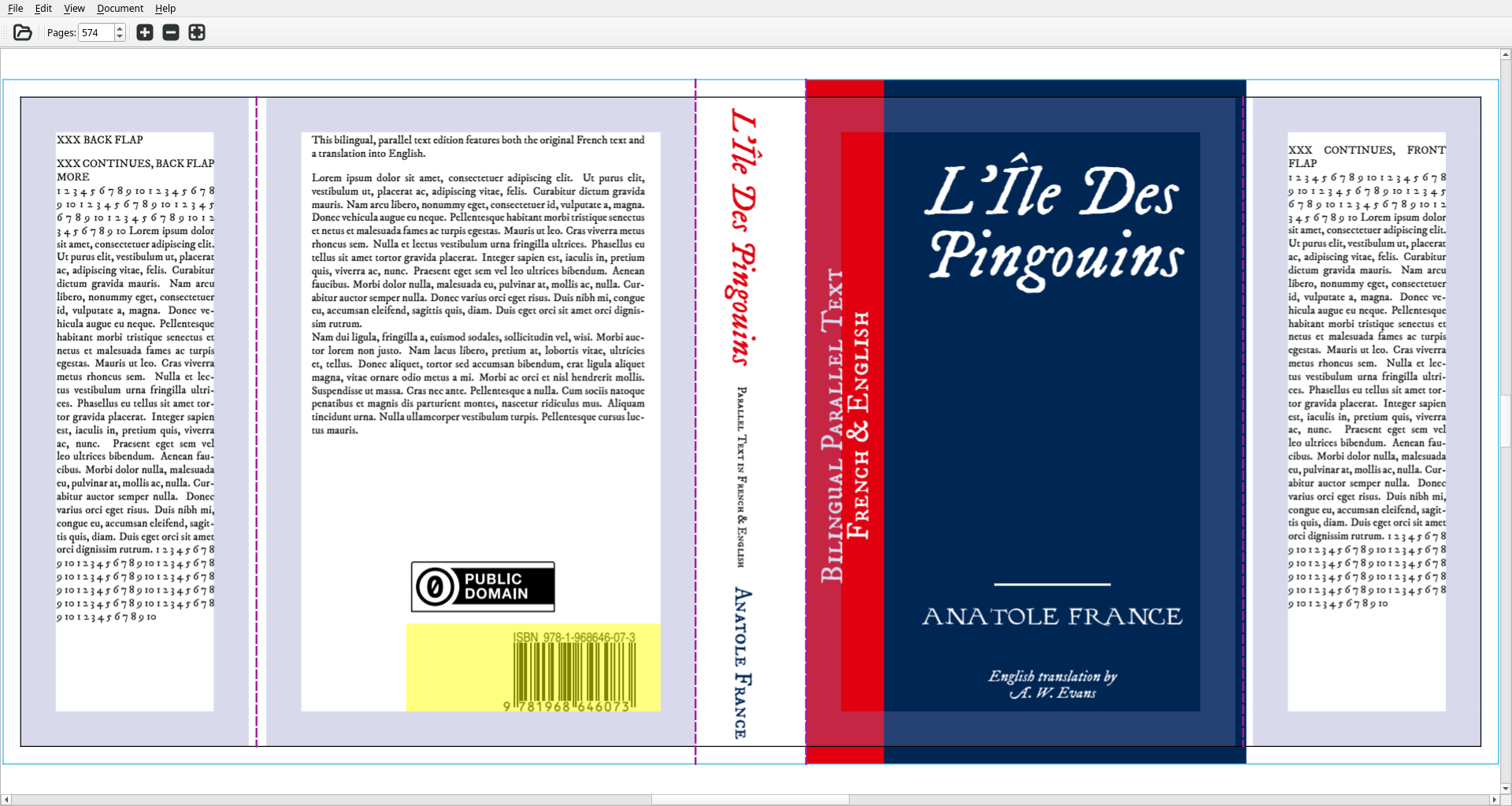
Features
- PDF Margin Visualization: Preview safety margins on any PDF document
- Multiple Document Types: Support for interior pages, covers, and dustjackets
- Interactive Navigation: Zoom, pan, and navigate through pages
- Presentation Mode: Full-screen presentation for reviewing layouts
- Configurable Margins: Customizable safety margins and spine dimensions
- Performance Optimized: Efficient rendering with caching and spatial indexing
Installation
System Requirements
- Python 3.9 or higher
Dependencies (Debian)
sudo apt install python3-pip python3-venv python-is-python3
Install from PyPi
The easiest install, suit to taste:
pip install momovu
Install from Source
git clone https://spacecruft.org/books/momovu
cd momovu/
python -m venv venv
source venv/bin/activate
pip install -U setuptools pip wheel
pip install -e .
Usage
Basic Usage
# Preview margins on a PDF
momovu document.pdf

# Specify document type and page count
momovu --document cover --num-pages 300 book.pdf

# Jump to a specific page in an interior document
momovu samples/bovary-interior.pdf --jump 50

# Short form with other options
momovu samples/bovary-interior.pdf -j 50 --side-by-side

# Enable debug logging
momovu --debug document.pdf
Command Line Options
$ momovu --help
usage: momovu [-h] [-D] [-v] [-V] [-n N] [-d TYPE] [-j PAGE] [-s] [-m | --safety-margins | --no-safety-margins] [-t | --trim-lines | --no-trim-lines] [-b | --barcode | --no-barcode] [-l | --fold-lines | --no-fold-lines] [-p] [-f] [PDF_FILE]

Preview margins on book PDFs before publication.

positional arguments:
  PDF_FILE              Path to the PDF file to preview margins for

options:
  -h, --help            show this help message and exit
  -D, --debug           Enable debug logging
  -v, --verbose         Increase output verbosity (can be used multiple times)
  -V, --version         Show version and exit
  -n, --num-pages N     Set number of pages for spine calculations (must be positive)
  -d, --document TYPE   Set document type for margin calculations (interior, cover, dustjacket)
  -j, --jump PAGE       Jump to page number (interior documents only)
  -s, --side-by-side    Enable side-by-side dual page view mode
  -m, --safety-margins, --no-safety-margins
                        Show safety margins (default: enabled)
  -t, --trim-lines, --no-trim-lines
                        Show trim lines (default: enabled)
  -b, --barcode, --no-barcode
                        Show barcode area for cover/dustjacket (default: enabled)
  -l, --fold-lines, --no-fold-lines
                        Show fold lines for cover/dustjacket (default: enabled)
  -p, --presentation    Start in presentation mode
  -f, --fullscreen      Start in fullscreen mode

Example: momovu --num-pages 300 --document cover book.pdf
Development
For main development docs, see:
To build and add to PyPi:
pip install -e .[dev]
python -m build
python -m twine upload dist/*
Links
- Main Website and Documentation: https://momovu.org
- Source Code: https://spacecruft.org/books/momovu
- Issues: https://spacecruft.org/books/momovu/issues
- Changelog: CHANGELOG.txt
Status
Stable - Works well.
License
Apache 2.0 License. See LICENSE-apache.txt for details.
This is an unofficial project, not related to any upstream projects.
Copyright © 2025 Jeff Moe